Clip Studio Paint Version 5.0 is on the way!
January 28, 2026
We are happy to announce that Clip Studio Paint Ver. 5.0 is coming out in March 2026.
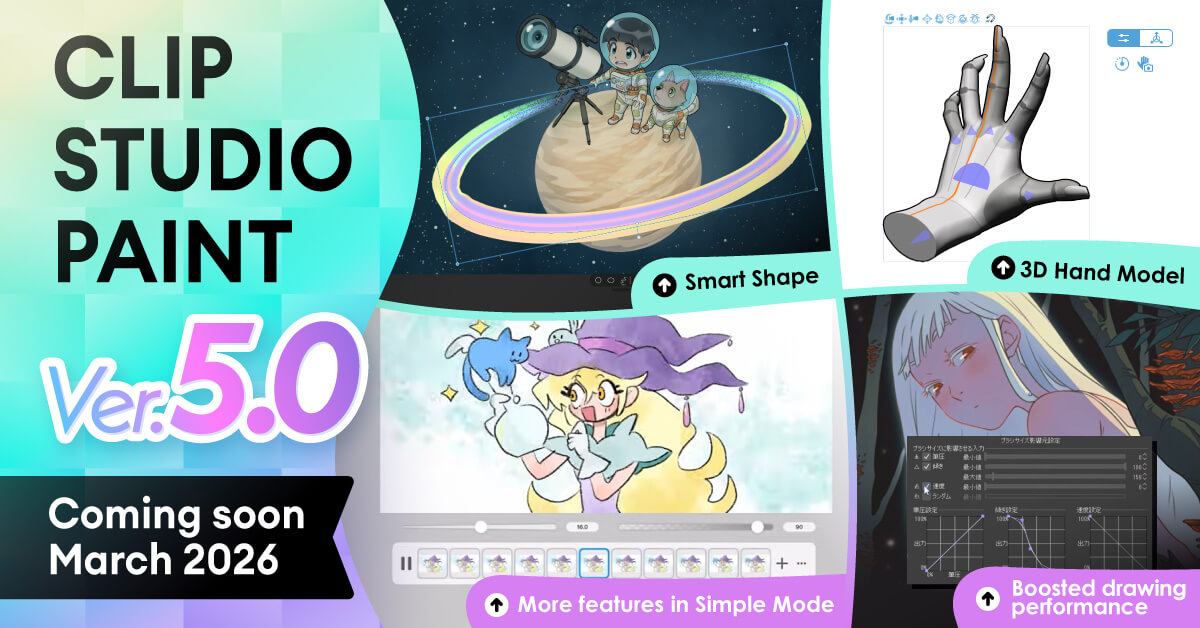
1. New Features in Ver. 5.0
Ver. 5.0 will include all the features that have been added since Ver. 4.0’s release, plus many new features.
Improved drawing capabilities and performance
Smart Shape
- Draw lines, curves, and shapes intuitively and efficiently.
- Quickly create accurate figures and shapes without switching from your pen or brush.
Faster rendering speed
- New setting for faster painting with large brushes with rougher rendering quality. Perfect for painting with watercolor brushes.
- Improved rendering speed for brushes with thick watercolor edge settings.
- Use stroke previews to reduce brush lag when drawing with high stabilization.
Improved blurring for drawing tools
- Blending quality has been added to Ink settings for brush tools. Set this to High Quality for smoother blending.
- When using the Blur tool or a brush with Running Color turned on, colors outside of the brush cursor or selection are no longer blended.
Velocity available as a new brush dynamic
- Added velocity graph to Pen Pressure Settings and Tilt Settings as an option for brush size and opacity input dynamics.
- Adjust the graph to increase the value the faster you draw.
Faster Fill tool
- Improved processing speed with more accurate results.
Enhanced 3D features
3D hand model
- Use high quality 3D hand models as references to improve your hand drawings.
- Freely adjust the model size with intuitive controls to suit your character design.
- Use hand pose materials and the Hand Scanner for quick posing.
Realistic textures for metal and gloss
- Supports material texture parameters set on 3D models in glTF format files and PBR materials in FBX or OBJ files.
- Add ambient light and panorama reflections for more realistic textures.
Paint on more 3D model types
- Draw directly on 3D objects with UV-mapped vertices as well as 3D primitives and 3D drawing figures.
- Add patterns or guide lines to use as references for different angles.
Group 3D objects
- Group multiple 3D models into a folder and move and rotate the group as one.
Improvements to interface and usability
Improved workspace and palettes
- Merged Sub Tools into Tools to simplify terms.
- Tool icons can now pop up with related palettes.
Upgraded Material palette
- Quickly see recently used materials in the new History folder.
- Easier to search and sort materials in the palette.
Auto-install downloaded materials
- Automatically add materials downloaded from Clip Studio Assets to the corresponding palette or list.
- Auto-install tools, color sets, Auto Actions, gradient sets, and workspaces.
Tonal correction for multiple layers
- Use Tonal Correction on multiple selected layers at once.
Improved Transform features
- Rotate the bounding box to align with the orientation of an object when transforming.
- Improved processing speed for rotating, scaling up, Free Transformation, Mesh Transformation, and Puppet Warp on raster layers.
Batch delete empty layers and hidden layers
- Select “Empty layers” to delete all layers with nothing drawn.
- Select “Hidden layers” to delete all hidden layers at once.
Enhanced multi-page and printed work features
Improved layer comps for multi-page works (EX)
- Apply selected layer comps to multiple pages at once.
- Batch export all layer comps or selected layer comps.
Improved color profile settings
- Set a color profile when creating a new canvas.
- Set an embedded profile to prevent colors from looking different when working across multiple environments.
- Previewed color profile is also reflected in color palettes.
Improved performance and creative experience
Continuous saving of clip files
- Continuously saves data for restoration. If the app is closed without saving, it will load the canvas before closing and restore it on restart.
Graph of daily creative hours
- See a graph of how long you’ve been creating under My Creative Hours in Clip Studio.
New features added to Simple Mode
Basic animations
- Draw while using onion skin to see neighboring frames.
Puppet warp
- Easily adjust character poses by transforming them like a movable puppet.
3D head models
- Adjust facial parts and angles for drawing references.
Sub View
- Display reference images in the app.
Additional languages
Simplified Chinese (Windows / macOS)
- Language supported on both PCs and mobile devices. Now available as an app display language.
2. How to get Ver. 5.0
-
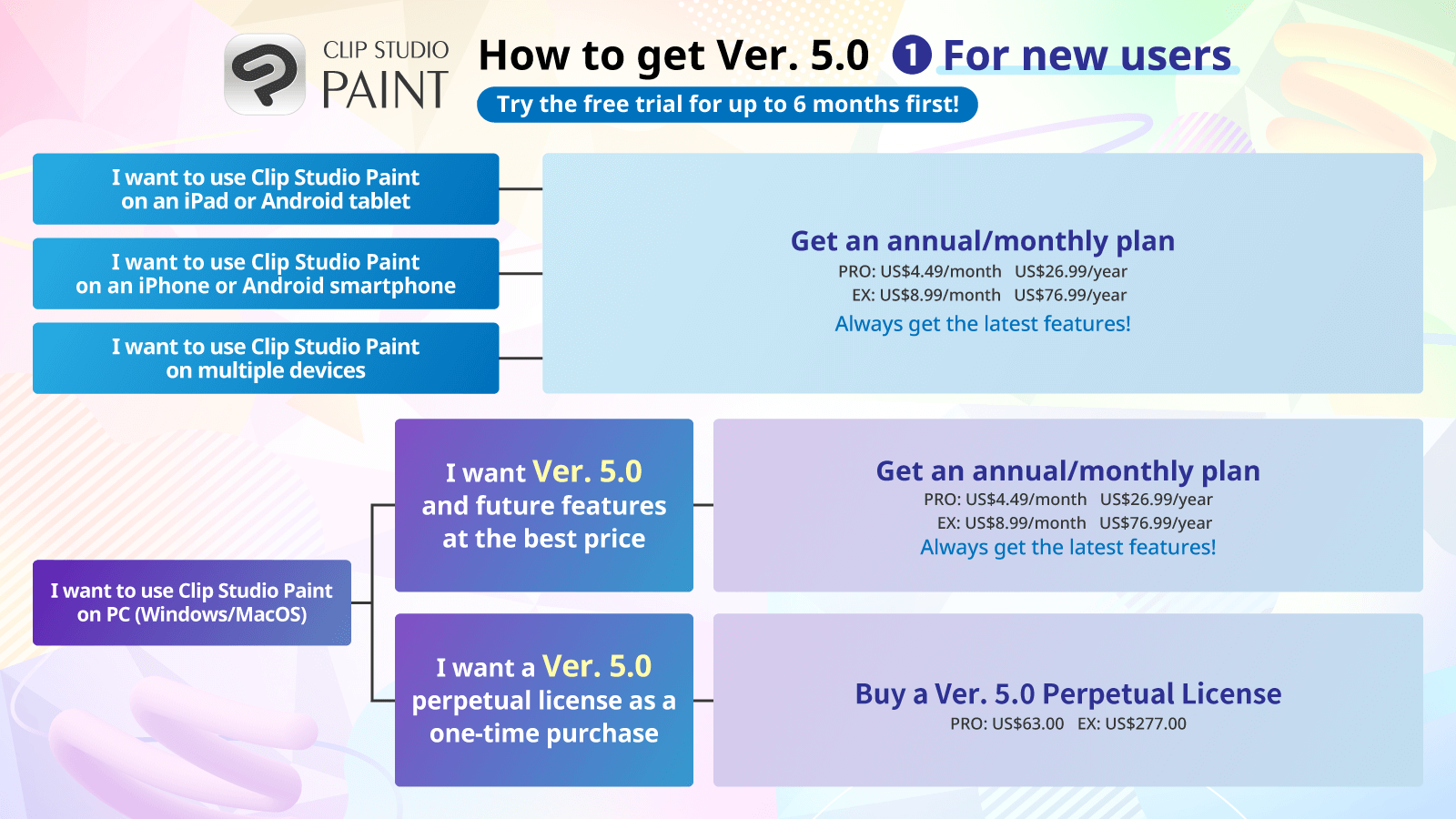
For New Users
-
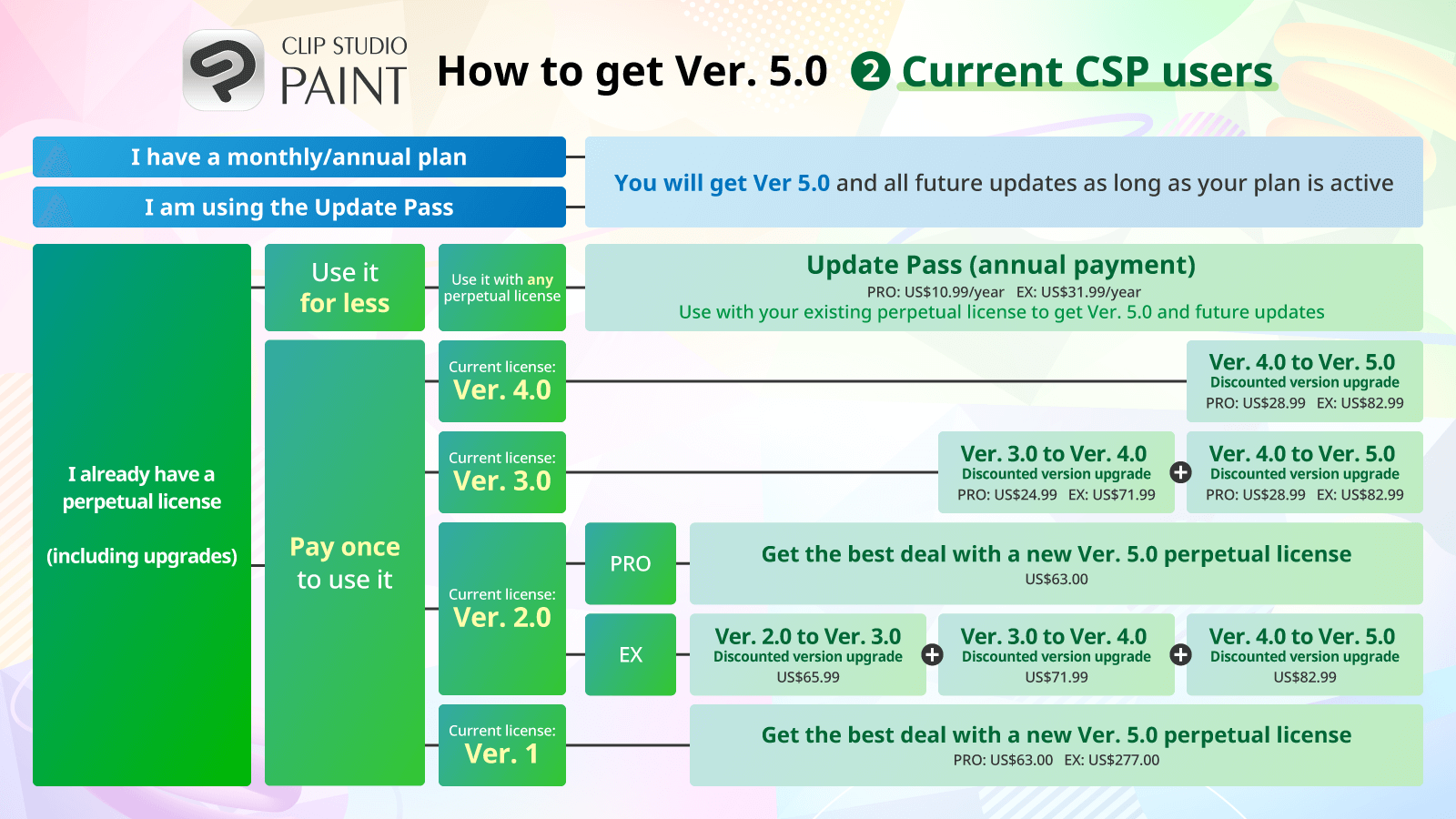
For Current Users
You can use Clip Studio Paint Ver. 5.0 with any of the following.
| Ver. 5.0 (Perpetual License) | One-time purchase | Windows / macOS | |
|---|---|---|---|
| Ver. 5.0 (Perpetual License) | |||
| One-time purchase | Windows / macOS | ||
|
|||
| Ver. 4.0 > 5.0 Discounted version upgrade (Perpetual License) |
One-time purchase | Windows / macOS | |
| Ver. 4.0 > 5.0 Discounted version upgrade (Perpetual License) |
|||
| One-time purchase | Windows / macOS | ||
|
|||
| Update Pass | Annual payment | Windows / macOS | |
| Update Pass | |||
| Annual payment | Windows / macOS | ||
|
|||
| Annual/Monthly plan | Monthly or annual payment | iPad / Android / Windows macOS / iPhone |
|
| Annual/Monthly plan | |||
| Monthly or annual payment | iPad / Android / Windows macOS / iPhone |
||
|
|||
See below for details on how to use Ver. 5.0 for new and existing users.
For new users
- Buy a Ver. 5.0 Perpetual License
- Subscribe to an annual/monthly plan
Ver. 4.0 perpetual license users
- Update Pass
- Buy the Ver. 4.0 > Ver. 5.0 discounted version upgrade
Ver. 3.0 perpetual license users
- Update Pass
- First get the discounted upgrade from Ver. 3.0 > Ver. 4.0 and then upgrade from Ver. 4.0 > Ver. 5.0.
Ver. 2.0 perpetual license users
- Update Pass
- If you want to use PRO with a one-time payment, the best value is to purchase a new Ver. 5.0 perpetual license.
- If you want to use EX with a one-time payment, the best value is to upgrade your license. First get the discounted upgrade from Ver. 2.0 > Ver 3.0, then purchase the discounted upgrade from Ver. 3.0 > Ver. 4.0 and from Ver. 4.0 to Ver. 5.0.
Ver. 1 perpetual license users
- Update Pass
- If you prefer a one-time payment, the best value is to purchase a new Ver. 5.0 perpetual license.
Annual/Monthly plan or Update Pass users
- You are good as is! You will continue having access to the latest version including Ver. 5.0 and beyond.
3. Ver. 5.0 Pricing
The following are the prices of the new products that will be available with the release of Ver. 5.0.
Clip Studio Paint PRO
| Ver. 5.0 (Perpetual License) | US$63.00 |
|---|---|
| Windows / macOS Ver. 4.0 > Ver. 5.0 discounted upgrade (perpetual license, one-time purchase) |
US$28.99 |
Clip Studio Paint EX
| Windows / macOS Ver. 5.0 (Perpetual License) |
US$277.00 |
|---|---|
| Windows / macOS Ver. 4.0 > Ver. 5.0 discounted upgrade (from EX, perpetual license, one-time purchase) |
US$82.99 |
| Windows / macOS Ver. 4.0 > Ver. 5.0 discounted upgrade (from PRO, perpetual version, one-time purchase) |
US$242.99 |
Note: All prices are tax inclusive
FAQ
- Will I be able to open .clip files created using Ver. 5.0 in Ver. 4.0 and earlier versions?
- Yes. However, when the .clip file is opened in Ver. 4 or earlier, you may not be able to edit parts that use new Ver. 5.0 features.
- I received a Ver. 4.0 perpetual version license from a pre-release offer last year. How can I get Ver. 5.0?
- Purchase the Ver. 4.0 > Ver. 5.0 discounted upgrade, or get the Update Pass to use Ver. 5.0.
- Is there a discounted upgrade for Ver. 3 or earlier to Ver. 5.0?
- We recommend that perpetual license users buy the Update Pass (annual payment) to access the latest versions at a lower price.
It is not possible to upgrade a perpetual license directly from Ver. 1, Ver. 2.0, or Ver. 3.0 to Ver. 5.0. The best deal for you to get Ver. 5.0 depends on the version you are currently using. Please see here for your current license and check out your options to get Ver. 5.0. - Can I continue to use Ver. 4.0 and earlier versions even after the release of Ver. 5.0?
- Yes, you can continue to use your existing license. We will still provide free stability patches when necessary to address major bugs in the app.
Feel free to get in touch with our support team at the following: