
Now up to 50% OFF!
Get Started
Perpetual License
An Upgrade Pass is required to access updates from 2.1.
Windows / macOS
Pay once and use all the features included in this version for as long as you want
Clip Studio Paint PRO Ver. 5.0 Edition
Perpetual License
Windows / macOS
0
0
0
0
OFF
Clip Studio Paint EX Ver. 5.0 Edition
Perpetual License
Windows / macOS
0
0
0
0
OFF
Clip Studio Paint PRO Ver. 5.0 Edition
Perpetual License
An Upgrade Pass is required to access updates from 2.1.
Windows / macOS
Perfect for character art, concept art, and illustration.
0
0
0
0
OFF
- Pay once and use Ver. 5.0 forever
- Available only on Windows/macOS
- Update Pass available separately to get feature updates
- Get 10GB of cloud data for your projects and materials
Clip Studio Paint EX Ver. 5.0 Edition
Perpetual License
An Upgrade Pass is required to access updates from 2.1.
Windows / macOS
All PRO features + extra features for comics and animation.
0
0
0
0
OFF
- Pay once and use Ver. 5.0 forever
- Available only on Windows/macOS
- Update Pass available separately to get feature updates
- Get 10GB of cloud data for your projects and materials
Clip Studio Paint PRO/EX Comparison
| Feature | PRO For professional illustration |
EX All PRO features + animation and comic features |
|---|---|---|
Illustration (Character art, concept art, etc.) |
||
Import/Use 3D models |
||
Extract lines from images and 3D models |
||
Save layer comps |
||
Single-page comic tools |
||
Multi-page projects |
||
Webtoon tools |
* | |
PDF/Ebook export |
||
Simple animation/movie creation |
||
Full-length animation tools |




*Taxes and additional charges vary depending on your country of residence.
How to buy the perpetual license (Windows/macOS)
Once payment is confirmed, you will receive an email containing your activation code at the email address you entered at the time of purchase.
(1) Enter your email address.
Please enter a valid email address to receive your activation code.
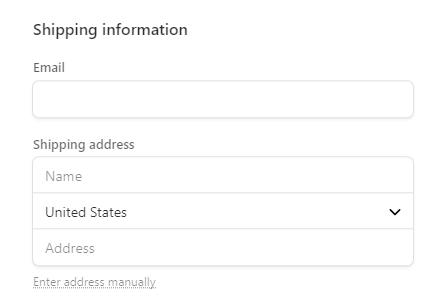
(2) Select the payment method.
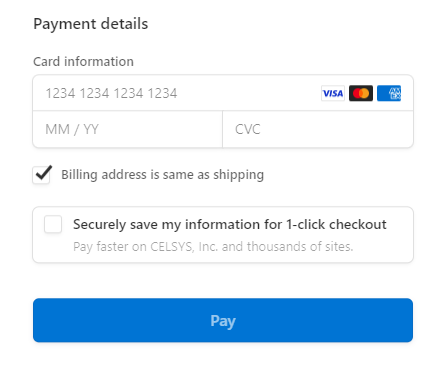
(3) Your activation code will be sent to the email address you entered.

Try before you buy!

1 year plan for single device
iPad / Android Windows / macOS iPhone / Android
Clip Studio Paint PRO
1 year plan for a single device
US$26.99
US$
13
.49
50% OFF
€25.49 / Can$36.49 / AU$40.99 / £20.99 / CN¥199.00 €12.69 / Can$17.99 / AU$20.49 / £10.49 / CN¥99.00
Clip Studio Paint EX
1 year plan for a single device
US$76.99
US$
53
.89
30% OFF
€68.99 / Can$98.99 / AU$111.99 / £59.99 / CN¥568.00 €48.29 / Can$69.29 / AU$78.39 / £41.99 / CN¥397.00
Clip Studio Paint PRO
1 year plan for a single device
iPad / Android Windows / macOS iPhone / Android
Get all updates for subscribers as part of your plan
US$26.99
US$
13
.49
50% OFF
€25.49 / Can$36.49 / AU$40.99 / £20.99 / CN¥199.00 €12.69 / Can$17.99 / AU$20.49 / £10.49 / CN¥99.00- First three months free*¹
- Save more with an annual plan
- Use it when you want, on the devices you want
- Get new materials every month for free
-

New features constantly being added
-

Download free official materials every month!
-

For a limited time only, you will receive Clippy when payment starts on your first subscription!*
-

While subscribed, your Clippy for buying materials will never expire!
-

10GB cloud storage (increase possible)
*Only for first-time subscribers
Clip Studio Paint EX
1 year plan for a single device
iPad / Android Windows / macOS iPhone / Android
Get all updates for subscribers as part of your plan
US$76.99
US$
53
.89
30% OFF
€68.99 / Can$98.99 / AU$111.99 / £59.99 / CN¥568.00 €48.29 / Can$69.29 / AU$78.39 / £41.99 / CN¥397.00- First three months free*¹
- Save more with an annual plan
- Use it when you want, on the devices you want
- Get new materials every month for free
-
New features constantly being added
-
Download free official materials every month!
-
For a limited time only, you will receive Clippy when payment starts on your first subscription!*
-
While subscribed, your Clippy for buying materials will never expire!
-
10GB cloud storage (increase possible)
*Only for first-time subscribers
12-month License (single payment)
iPad / Android Windows / macOS iPhone / Android
Single payment code for 12 months of Clip Studio Paint
Clip Studio Paint PRO
Single-device 12-month License
0
SAVE
This product is temporarily unavailable for purchase.
Clip Studio Paint EX
Single-device 12-month License
0
SAVE
This product is temporarily unavailable for purchase.
*Taxes and additional charges vary depending on your country of residence.
How to buy the 12-month License (iPad / Android / Windows / macOS / iPhone)
Once payment is confirmed, you will receive an email containing your activation code at the email address you entered at the time of purchase.
(1) Log in to your Clip Studio account.
An activation code will be sent to the email address registered to your Clip Studio account.

(2) Select the payment method.
(3) Your activation code will be sent to the email address you entered.
Clip Studio Paint PRO
Single-device 12-month License
iPad / Android Windows / macOS iPhone / Android
One-time payment code for 12 months of Clip Studio Paint PRO
0
SAVE
This product is temporarily unavailable for purchase.
- Use all the latest features
- No auto-renewal, this license will expire after a year
- If you want to use it for longer you will need to buy another year license
- You can apply this to your current plan, or sign up for a new one with this license
- You can add up to four years to your plan
- This license cannot be used to extend plans from the App Store, Google Play Store, Galaxy Store, etc.
- Get 10GB of cloud data for your projects and materials
Clip Studio Paint EX
Single-device 12-month License
iPad / Android Windows / macOS iPhone / Android
One-time payment code for 12 months of Clip Studio Paint EX
0
SAVE
This product is temporarily unavailable for purchase.
- Use all the latest features
- No auto-renewal, this license will expire after a year
- If you want to use it for longer you will need to buy another year license
- You can apply this to your current plan, or sign up for a new one with this license
- You can add up to four years to your plan
- This license cannot be used to extend plans from the App Store, Google Play Store, Galaxy Store, etc.
- Get 10GB of cloud data for your projects and materials
Buy GOLD
GOLD
Gold is used to purchase Clip Studio Assets materials.
GOLD Membership
- Get up to 1,980 Clippy points every month to trade for materials to use to enhance your art
- Get more Clippy rewards for longer membership
- No expiration date on Clippy points
What is GOLD?
GOLD is a type of point that can be used to purchase materials from Clip Studio Assets. 100 GOLD costs 100 JPY (about 1 USD) and can be purchased with a credit card. There are a number of ways to acquire GOLD.
Purchasing GOLD
Buy only what you need, when you need it, in units of 500 GOLD.
GOLD auto-charge
When purchasing GOLD materials from Clip Studio Assets or setting the payment method for GOLD membership to GOLD Auto-charge, you can buy and pay automatically in GOLD even if your balance is insufficient.
Purchase GOLD charge code
You can buy GOLD with your PayPal account. You can also send the GOLD charge code as a gift to your fellow creators. The charge code can be purchased in units of 1,000 GOLD.
GOLD Membership
Subscribe to get the most out of Clip Studio Assets.
- The GOLD Membership costs 200 GOLD per month, and offers a variety of benefits.
- Every month you will receive at least 1,500 Clippy so you can buy more types of materials!
- The longer you remain a member, the more Clippy you will receive each month. (Up to 1,980 CLIPPY)
- For non-members, Clippy is valid for 6 months, but as a GOLD member, your Clippy will not expire.
* There are two types of Clippy: Clippy tokens, which are stored in the Clippy wallet, and Clippy tickets, which are stored in My Uploads and can be exchanged for prizes. Clippy cannot be purchased or exchanged for GOLD.
Dedicated shortcut device for Clip Studio Paint
The following are excluded from the sale
Update Pass
Windows / macOS
Access all future updates with this add-on for your one-time purchase license
Clip Studio Paint PRO
Windows / macOS
0
Clip Studio Paint EX
Windows / macOS
0
Clip Studio Paint PRO
Update Pass (Annual)
Windows / macOS
Access all the latest updates from 5.0 and onwards at a low price with this add-on for perpetual licenses
- Cheaper than buying a version upgrade
- Get all feature updates for a year
- First-time users get a bonus month free
- Renews automatically every year
- The Update Pass will automatically be applied to the account you are signed into at the time of purchase
- Option to change your maximum cloud storage capacity (paid option)
Clip Studio Paint EX
Update Pass (Annual)
Windows / macOS
Access all the latest updates from 5.0 and onwards at a low price with this add-on for perpetual licenses
- Cheaper than buying a version upgrade
- Get all feature updates for a year
- First-time users get a bonus month free
- Renews automatically every year
- The Update Pass will automatically be applied to the account you are signed into at the time of purchase
- Option to change your maximum cloud storage capacity (paid option)
Ver. 4.0 / 5.0 users
Use additional features by upgrading
- The Update Pass is the best deal to access the latest versions, including between major releases
Discounted version upgrade (Ver. 4.0 » Ver. 5.0)
An Upgrade Pass is required to access updates from 2.1.
Windows / macOS
PRO Ver. 4.0 » PRO Ver. 5.0 Version upgrade
Perpetual License
Windows / macOS
0
0
0
0
OFF
EX Ver. 4.0 » EX Ver. 5.0 Version upgrade
Perpetual License
Windows / macOS
0
0
0
0
OFF
PRO Ver. 4.0 » PRO Ver. 5.0 Version upgrade
Windows / macOS
Upgrade your Ver. 4.0 perpetual license to a Ver. 5.0 perpetual license with a discount
0
0
0
0
OFF
- Pay once and use Ver. 5.0 forever
- Update Pass available separately to get feature updates
- You can apply your upgraded license after installing the new version by starting the app, changing the license, and then restarting the app
- Tap here for the upgrade to EX Ver. 5.0
EX Ver. 4.0 » EX Ver. 5.0 Version upgrade
Windows / macOS
Upgrade your Ver. 4.0 perpetual license to a Ver. 5.0 perpetual license with a discount
0
0
0
0
OFF
- Pay once and use Ver. 5.0 forever
- Update Pass available separately to get feature updates
- You can apply your upgraded license after installing the new version by starting the app, changing the license, and then restarting the app
Discounted upgrade PRO » EX
An Upgrade Pass is required to access updates from 2.1.
Windows / macOS
PRO Ver. 4.0 » EX Ver. 5.0 Upgrade
Perpetual License
Windows / macOS
0
0
0
0
OFF
PRO Ver. 4.0 » EX Ver. 5.0 Upgrade
Windows / macOS
Upgrade your PRO Ver. 4.0 perpetual license to an EX Ver. 5.0 perpetual license with a discount
0
0
0
0
OFF
- Pay once and use Ver. 5.0 forever
- Update Pass available separately to get feature updates
- To access the latest features after purchasing, update to the latest version, switch your license in the app, and restart the app
PRO Ver. 5.0 » EX Ver. 5.0 Upgrade
Perpetual License
Windows / macOS
0
0
0
0
OFF
PRO Ver. 5.0 » EX Ver. 5.0 Upgrade
Windows / macOS
Upgrade your PRO Ver. 5.0 perpetual license to an EX Ver. 5.0 perpetual license with a discount
0
0
0
0
OFF
- Pay once and use Ver. 5.0 forever
- Update Pass available separately to get feature updates
- To access the latest features after purchasing, update to the latest version, switch your license in the app, and restart the app
PRO Ver. 4.0 » EX Ver. 4.0 Upgrade
Perpetual License
Windows / macOS
0
SAVE
Buy Now
This product is not on sale
PRO Ver. 4.0 » EX Ver. 4.0 Upgrade
Windows / macOS
Upgrade your PRO Ver. 4.0 perpetual license to an EX Ver. 4.0 perpetual license with a discount
0
SAVE
Buy Now
This product is not on sale
- Pay once and use Ver. 4.0 forever
- Update Pass available separately to get feature updates
- To access the latest features after purchasing, update to the latest version, switch your license in the app, and restart the app
Ver. 3.0 users
Use additional features by upgrading
-
The Update Pass is the best deal to access the latest versions, including between major releases
To upgrade your perpetual license
-
For PRO: If you want PRO Ver. 5.0 perpetual license, purchase a new PRO Ver. 5.0 license for the best deal!
- For EX: Upgrade your license to Ver. 4.0 and then to Ver. 5.0 for the best deal.
If you want Ver. 5.0 perpetual license
Ver. 3.0 PRO users: It is more economical to purchase a new PRO Ver. 5.0 license.
Even if you want to upgrade to EX, it is more economical to purchase a new EX Ver. 5.0 license.
New Purchase |
Price US$37.79 |
|||
Discounted version upgrades (x2) PRO Ver. 3.0 >> PRO Ver. 4.0(US$19.99) PRO Ver. 4.0 >> PRO Ver. 5.0(US$23.19) |
Total Amount US$43.18 |
|||
Ver. 3.0 EX users: You’ll save more by upgrading your license to Ver. 4.0, and then Ver. 5.0.
Discounted version upgrades (x2) EX Ver. 3.0 >> EX Ver. 4.0(US$57.49) EX Ver. 4.0 >> EX Ver. 5.0(US$66.39) |
Total Amount US$123.88 |
|||
New Purchase |
Price US$221.59 |
|||
Discounted version upgrade (Ver. 3.0 » Ver. 4.0)
An Upgrade Pass is required to access updates from 2.1.
Windows / macOS
PRO Ver. 3.0 » PRO Ver. 4.0 Version upgrade
Perpetual License
Windows / macOS
0
0
0
0
OFF
EX Ver. 3.0 » EX Ver. 4.0 Version upgrade
Perpetual License
Windows / macOS
0
0
0
0
OFF
PRO Ver. 3.0 » PRO Ver. 4.0 Version upgrade
Windows / macOS
Upgrade your Ver. 3.0 perpetual license to a Ver. 4.0 perpetual license with a discount
0
0
0
0
OFF
- Pay once and use Ver. 4.0 forever
- Update Pass available separately to get feature updates
- You can apply your upgraded license after installing the new version by starting the app, changing the license, and then restarting the app
- Tap here for the upgrade to EX Ver. 4.0
EX Ver. 3.0 » EX Ver. 4.0 Version upgrade
Windows / macOS
Upgrade your Ver. 3.0 perpetual license to a Ver. 4.0 perpetual license with a discount
0
0
0
0
OFF
- Pay once and use Ver. 4.0 forever
- Update Pass available separately to get feature updates
- You can apply your upgraded license after installing the new version by starting the app, changing the license, and then restarting the app
Discounted upgrade PRO » EX
An Upgrade Pass is required to access updates from 2.1.
Windows / macOS
PRO Ver. 3.0 » EX Ver. 4.0 Upgrade
Perpetual License
Windows / macOS
0
0
0
0
OFF
PRO Ver. 3.0 » EX Ver. 4.0 Upgrade
Windows / macOS
Upgrade your PRO Ver. 3.0 perpetual license to an EX Ver. 4.0 perpetual license with a discount
0
0
0
0
OFF
- Pay once and use Ver. 4.0 forever
- Update Pass available separately to get feature updates
- To access the latest features after purchasing, update to the latest version, switch your license in the app, and restart the app
Ver. 2.0 users
Use additional features by upgrading
-
The Update Pass is the best deal to access the latest versions, including between major releases
To upgrade your perpetual license
-
For PRO: If you want PRO Ver. 5.0 perpetual license, purchase a new PRO Ver. 5.0 license for the best deal!
- For EX: Upgrade your license to Ver. 3.0, then Ver. 4.0, and finally to Ver. 5.0 for the best deal.
If you want Ver. 5.0 perpetual license
Ver. 2.0 PRO users: It is more economical to purchase a new PRO Ver. 5.0 license. Even if you want to upgrade to EX, it is more economical to purchase a new EX Ver. 5.0 license.
New Purchase |
Price US$37.79 |
|||
Discounted version upgrades (x3) PRO Ver. 2.0 >> PRO Ver. 3.0(US$16.09) PRO Ver. 3.0 >> PRO Ver. 4.0(US$19.99) PRO Ver. 4.0 >> PRO Ver. 5.0(US$23.19) |
Total Amount US$59.27 |
|||
Ver. 2.0 EX users: Upgrade your license to Ver. 3.0, then Ver. 4.0, and finally to Ver. 5.0 for the best deal.
Discounted version upgrades (x3) EX Ver. 2.0 >> EX Ver. 3.0(US$46.19) EX Ver. 3.0 >> EX Ver. 4.0(US$57.49) EX Ver. 4.0 >> EX Ver. 5.0(US$66.39) |
Total Amount US$170.07 |
|||
New Purchase |
Price US$221.59 |
|||
Discounted version upgrade (Ver. 2.0 » Ver. 3.0)
An Upgrade Pass is required to access updates from 2.1.
Windows / macOS
PRO Ver. 2.0 » PRO Ver. 3.0 Version upgrade
Perpetual License
Windows / macOS
0
0
0
0
OFF
EX Ver. 2.0 » EX Ver. 3.0 Version upgrade
Perpetual License
Windows / macOS
0
0
0
0
OFF
PRO Ver. 2.0 » PRO Ver. 3.0 Version upgrade
Windows / macOS
Upgrade your Ver. 2.0 perpetual license to a Ver. 3.0 perpetual license with a discount
0
0
0
0
OFF
- Pay once and use Ver. 3.0 forever
- Update Pass available separately to get feature updates
- You can apply your upgraded license after installing the new version by starting the app, changing the license, and then restarting the app
- Tap here for the upgrade to EX Ver. 3.0
EX Ver. 2.0 » EX Ver. 3.0 Version upgrade
Windows / macOS
Upgrade your Ver. 2.0 perpetual license to a Ver. 3.0 perpetual license with a discount
0
0
0
0
OFF
- Pay once and use Ver. 3.0 forever
- Update Pass available separately to get feature updates
- You can apply your upgraded license after installing the new version by starting the app, changing the license, and then restarting the app
Discounted upgrade PRO » EX
An Upgrade Pass is required to access updates from 2.1.
Windows / macOS
PRO Ver. 2.0 » EX Ver. 3.0 Upgrade
Perpetual License
Windows / macOS
0
0
0
0
OFF
PRO Ver. 2.0 » EX Ver. 3.0 Upgrade
Windows / macOS
Upgrade your PRO Ver. 2.0 perpetual license to an EX Ver. 3.0 perpetual license with a discount
0
0
0
0
OFF
- Pay once and use Ver. 3.0 forever
- Update Pass available separately to get feature updates
- To access the latest features after purchasing, update to the latest version, switch your license in the app, and restart the app
Ver. 1 users
Use additional features by upgrading
-
The Update Pass is the best deal to access the latest versions, including between major releases
To upgrade your perpetual license
-
For PRO: It is more economical to purchase a new PRO Ver. 5.0 license
- For EX: Upgrade your license to Ver. 2.0, then Ver. 3.0, then Ver. 4.0, and finally to Ver. 5.0 for the best deal.
If you want Ver. 5.0 perpetual license
Ver. 1 PRO users: It is more economical to purchase a new PRO Ver. 5.0 license.
The same goes for if you want to use EX Ver. 5.0 as well.
New Purchase |
Total Amount US$37.79 |
|||
Discounted version upgrades (x4) PRO Ver. 1 >> PRO Ver. 2.0(US$11.99) PRO Ver. 2.0 >> PRO Ver. 3.0(US$16.09) PRO Ver. 3.0 >> PRO Ver. 4.0(US$19.99) PRO Ver. 4.0 >> PRO Ver. 5.0(US$23.19) |
Total Amount US$71.26 |
|||
EX Ver. 1 users: Upgrade your license to Ver. 2.0, then Ver. 3.0, then Ver. 4.0, and finally to Ver. 5.0 for the best deal.
Verify the activation code in the email you receive after purchasing Ver. 2.0 on this page to purchase a discounted upgrade to the next version. From Ver. 2.0 onwards, you’ll be able to purchase the next discounted upgrade immediately after purchase.
Discounted version upgrades (x4) EX Ver. 1 >> EX Ver. 2.0(US$34.19) EX Ver. 2.0 >> EX Ver. 3.0(US$46.19) EX Ver. 3.0 >> EX Ver. 4.0(US$57.49) EX Ver. 4.0 >> EX Ver. 5.0(US$66.39) |
Total Amount US$204.26 |
|||
New Purchase |
Price US$221.59 |
|||
Discounted version upgrade (Ver. 1 » Ver. 2.0)
An Upgrade Pass is required to access updates from 2.1.
Windows / macOS
PRO Ver. 1 » PRO Ver. 2.0 Version upgrade
Perpetual License
Windows / macOS
0
0
0
0
OFF
EX Ver. 1 » EX Ver. 2.0 Version upgrade
Perpetual License
Windows / macOS
0
0
0
0
OFF
PRO Ver. 1 » PRO Ver. 2.0 Version upgrade
Windows / macOS
Upgrade your Ver. 1 perpetual license to a Ver. 2.0 perpetual license with a discount
0
0
0
0
OFF
- Pay once and use Ver. 2.0 forever
- Update Pass available separately to get feature updates
- You can apply your upgraded license after installing the new version by starting the app, changing the license, and then restarting the app
- Tap here for the upgrade to EX Ver. 2.0
EX Ver. 1 » EX Ver. 2.0 Version upgrade
Windows / macOS
Upgrade your Ver. 1 perpetual license to a Ver. 2.0 perpetual license with a discount
0
0
0
0
OFF
- Pay once and use Ver. 2.0 forever
- Update Pass available separately to get feature updates
- You can apply your upgraded license after installing the new version by starting the app, changing the license, and then restarting the app
Discounted upgrade PRO » EX
An Upgrade Pass is required to access updates from 2.1.
Windows / macOS
PRO Ver. 1 » EX Ver. 2.0 Upgrade
Perpetual License
Windows / macOS
0
0
0
0
OFF
PRO Ver. 1 » EX Ver. 2.0 Upgrade
Windows / macOS
Upgrade your PRO perpetual license to an EX Ver. 2.0 perpetual license with a discount
0
0
0
0
OFF
- Pay once and use Ver. 2.0 forever
- Update Pass available separately to get feature updates
- To access the latest features after purchasing, update to the latest version, switch your license in the app, and restart the app
Dedicated shortcut device for Clip Studio Paint
Buy Clip Studio Paint
Volume License
iPad / Android Windows / macOS iPhone / Android
- Each user can use their license on up to two devices
- Manage all plans with a console, great for schools and companies
For Schools and Educators
For Business




© CELSYS, Inc.
 Celsys, Inc. / President: Narushima Kei / Corporate Number (Japan): 1011101062869
Pacific Marks Shinjuku Parkside 2F, 4-15-7 Nishi-Shinjuku, Shinjuku-ku, Tokyo 160-0023 Japan
+81-3-3372-3156 support@celsys.com